Resumen rápido
Considering including this device in your mining rig? This article contains everything that is really important for you to know: the detailed technical specifications of the equipment, its cost of operation, a step-by-step guide to setup, and reliable information about the income potential, calculated using real electricity rates.
Goldshell SC5 Pro: Why Is This Machine Getting More Attention Right Now?
Goldshell SC5 Pro is one of the more talked-about machines in the Sia mining world right now, and for good reason. It runs on the Blake2b-Sia hashing algorithm and gives miners a decent shot at steady returns without needing a data center in your backyard. If you’re weighing whether this ASIC miner deserves a spot on your mining rack, this article walks through the specs, the setup process, and whether the numbers actually make sense in today’s market.
What Exactly Is This Goldshell Siacoin Miner?
This machine is a dedicated minero de criptomonedas built by Goldshell, made specifically to mine Siacoin (SC) using its dedicated hashing algorithm. Unlike general-purpose GPUs that can switch between coins, this hardware is locked into one job, and it does that job efficiently.
Goldshell released this unit in January 2024, and it’s available as two separate miners:
- 11TH: the original release version
- II 14TH: an upgraded miner with a bumped-up hashrate
Both versions run on the same core algorithm, but the II variant pushes more computing power at the cost of higher electricity draw. We’ll get into exactly how much that matters for your wallet a bit later.
What Are the Full Specifications of SC5 Pro ASIC Miner?
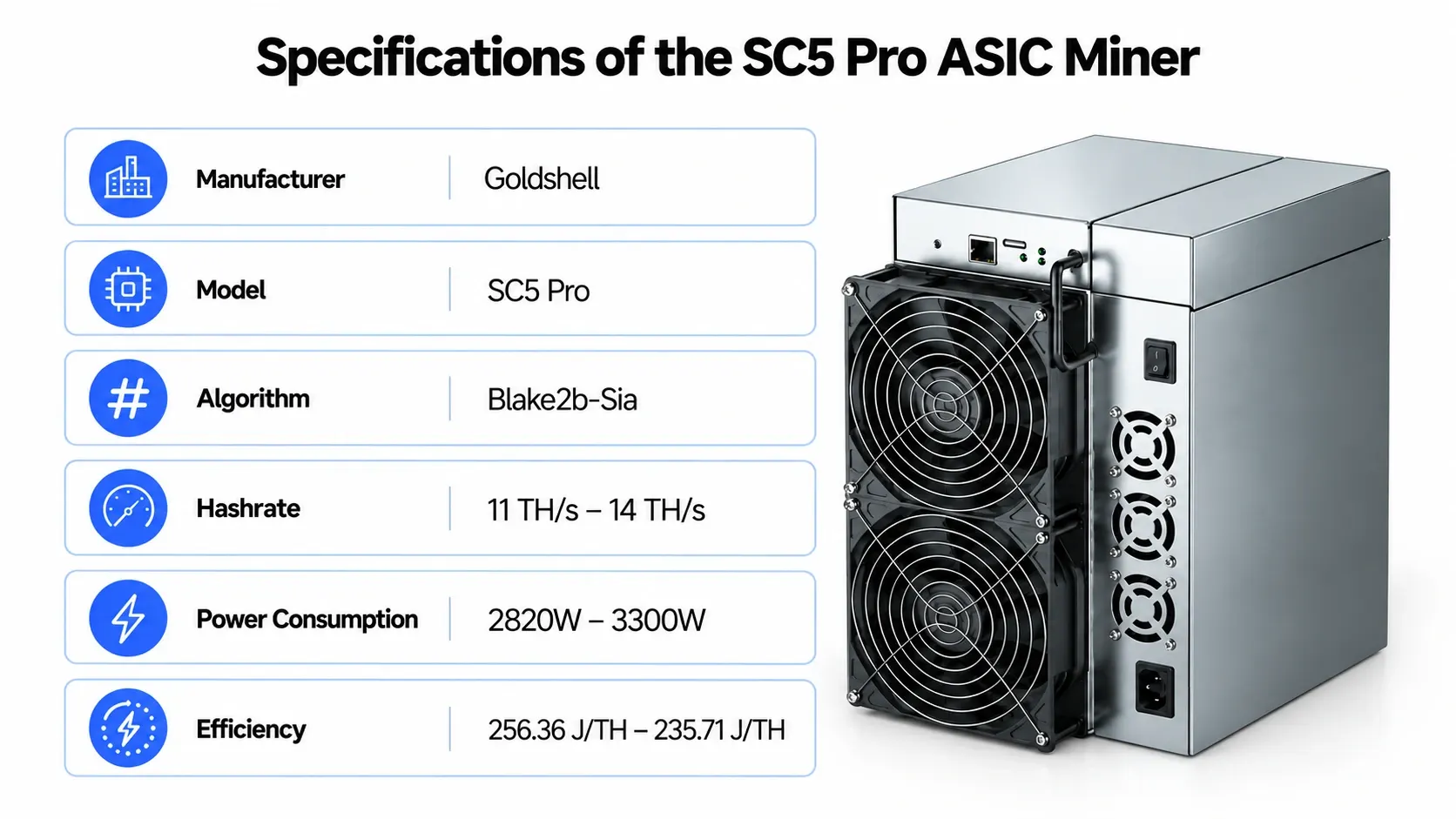
Before you spend anywhere between $3,979 and $4,789 on a mining rig, you want to know exactly what you’re getting. Here’s the full spec sheet, pulled straight from the manufacturer’s listing:
| Especificación | Detalles |
| Fabricante | Goldshell |
| model | SC5 Pro |
| También conocido como | Goldshell Sia Coin Device |
| Algoritmo | Blake2b-Sia |
| Tasa de hash | 11 TH/s – 14 TH/s |
| Consumo de Energía | 2820W – 3300W |
| Fecha de lanzamiento | Enero de 2024 |
| Peso neto | 11,500g (11.5 kg) |
| Peso bruto | 13,100g (13.1 kg) |
| Dimensions (without packaging) | 264 x 200 x 290 mm |
| Dimensions (with packaging) | 370 x 305 x 450 mm |
| Nivel de ruido | 80 dB |
| Número de ventiladores | 4 |
| Interfaz - Ethernet | Ethernet |
| Temperatura de funcionamiento | 5°C – 45°C |
| Humedad de operación | 5% – 95% |
| Garantía | 180 days (up to 365 days depending on order) |
The noise from this machine can go up to 80 dB, which is equivalent to that of a running vacuum cleaner all day. Therefore, this kind of machine should not be located near the bedroom.
How Does the 11TH Compare to the II 14TH?
Since Goldshell sells this hardware as two separate rigs, it helps to see them next to each other before deciding which one fits your budget and setup.
| Característica | 11TH | II 14TH |
| Tasa de hash | 11 TH/s | 14 TH/s |
| Consumo de energía | 2820W | 3300W |
| Algoritmo | Same hashing method on both versions | Same hashing method on both versions |
| Price Range | Starts around $3,979 | Runs higher, near $4,789 |
| Lo mejor para | Lower upfront cost, moderate power bills | Higher output for miners chasing more raw hashrate |
| Nivel de ruido | 80 dB | 80 dB |
If your electricity rate is on the higher side, the 11TH version often makes more financial sense because the extra hashrate on the II 14TH doesn’t always outweigh the added power cost. It really comes down to your local kWh rate.
How Do You Set Up Goldshell SC5 Pro Mining Hardware?

However, installing a mining machine is not particularly difficult, but missing out on any steps could be a time-consuming, expensive, or even hardware-loss mistake.
Here’s a practical walkthrough.
- Prepare Your Mining Space
Choose a location where there will be no problem with heat, dust, and noise. This device requires almost 3000W of power. Thus, you should ensure that there are enough resources available in the electrical circuit. The best way is to provide a 220V circuit just for this equipment.
- Check Your Power Supply
This machine ships with its PSU included, which saves you a separate purchase. Confirm the input voltage matches your regional power standard (most Goldshell units run on 176–264V input) before plugging anything in.
- Set Up Ventilation
With four fans running constantly and heat output that matches the power draw, you need airflow that pushes hot air out of the room, not just around it. Exhaust fans or a vented enclosure work well here.
- Conectar por Ethernet
The machine has an Ethernet interface that is not Wi-Fi. The machine should be connected straight to your router or switch. A stable wired connection reduces downtime, which directly affects how much SC you actually collect.
- Log in to the Miner’s Dashboard
After turning it on and connecting it, find the miner’s IP address from the list of connected devices in your router and then log into the admin page using it.
- Join a Mining Pool in Sia
Sia is not practical for solo mining. Input the stratum URL, worker name, and password for the mining pool in which you wish to mine. There are several pools that offer this form of hashing.
- Enter Your Wallet Address
Double-check your Siacoin wallet address before saving settings. A typo here means lost coins that are basically impossible to recover.
- Monitor Performance Regularly
Check the performance of the hashrate and temperature for the first 48 hours. The reason for a rapid decrease in the hashrate can only be the disconnection of the link, overheating of the chip, or a pool settings problem.
How Does Siacoin Mining Differ From Bitcoin Mining?
Nevertheless, mining of Siacoin differs greatly from any other crypto mining, especially if you are acquainted with mining of cryptocurrencies that use the SHA-256 hashing algorithm such as Bitcoin. You should be aware of what makes it unique before putting your power budget into it.
- Bitcoin runs on SHA-256, a much heavier hashing process. This hardware works off something lighter, built specifically for the Sia storage network, and honestly, that’s a big reason it can stay profitable at a scale where a Bitcoin rig would give up.
- Sia’s total network hashrate isn’t anywhere near Bitcoin’s. That’s actually good news for you, since a single machine can still grab a real slice of block rewards instead of getting buried under a mountain of competing hardware.
- Sia isn’t just a coin people flip on hype. It powers an actual decentralized cloud storage marketplace, so SC’s value ties back to real demand for storage space, not just chart-watching and speculation.
- Getting started costs less too. ASIC prices for Sia-focused rigs tend to run lower than flagship Bitcoin miners, so you’re not stuck saving up for months to get your first machine running.
None of the above constitutes a guarantee of profit. Still, it does account for why many miners prefer to go for small-cap currencies such as Siacoin rather than spending thousands of dollars on Bitcoin mining equipment.
How Much Does Electricity Really Cost You Over a Year?
As power consumption is the recurring expense, it makes sense to see what one year would look like at varying costs. For example, 2820W at the 11TH in continuous use over a year comes out to about 24,703 kWh. This will give you an accurate estimate according to your rate.
| Electricity Rate (per kWh) | Estimated Annual Power Cost |
| $0.05 | ~$1,235 |
| $0.08 | ~$1,976 |
| $0.10 | ~$2,470 |
| $0.12 | ~$2,964 |
This is why so many experienced miners chase cheap power deals, solar setups, or off-peak industrial rates before scaling up their operation. A rig that looks good on returns at $0.05 per kWh can look completely different at $0.15.
What Determines Siacoin Mining Profitability?
Your earnings aren’t just about how fast your machine hashes. Several moving pieces determine whether you come out ahead each month:
- Costo de electricidad: This is usually the single biggest factor. A machine pulling 2820W-3300W around the clock adds up fast on your power bill.
- Siacoin market price: SC’s price swings affect your daily revenue even if your hashrate stays the same.
- Dificultad de la red: As more miners join the network, difficulty rises, and your share of rewards per TH/s naturally shrinks over time.
- Fees charged by pools: Most pools charge you 1% to 3% of the money that you earn, effectively reducing your profit margin.
- Falta del tiempo: Any downtime due to disconnection of electricity or any issues related to your machine will result in zero coins earned.
What Does a Realistic Earnings Table Look Like?
Numbers change daily with SC price and network difficulty, so the smartest move is running a live calculator with your own electricity rate before buying. Here’s a real snapshot from a mining earnings calculator, using the 11TH at 2820W and a $0.05 per kWh electricity rate:
| Mining Method | Ganancia/Día | Ganancia/Mes | Ganancia/Año |
| Direct SC Mining (Pool) | -$0.67 | -$20.00 | -$245.77 |
| Renting Out Hashpower (MRR) | $544.71 | $16,341.19 | $198,817.86 |
That’s a striking gap, and it comes down to how you put the hardware to work:
- Direct pool mining means pointing the machine straight at a Siacoin pool and collecting SC block rewards. At current network difficulty and coin price, this comes out slightly negative once electricity is factored in. The machine is basically running at a small loss.
- Renting out hashpower through a marketplace like MRR (Mining Rig Rentals) means other buyers pay you directly for your hashrate, independent of what SC is worth that day. In the snapshot above, this route turns the same hardware into a strongly profitable setup.
This is a good reminder that the “coin you mine” isn’t always the best way to earn from an ASIC. Checking both direct mining and rental marketplace rates before committing to one method can make a real difference to your bottom line. Since these figures shift with market conditions, always plug in your own power cost and check current rental rates before deciding how to run your machine.
Is SC5 Pro Machine a Good Crypto Miner for Beginners?
For someone new to digital currency mining, this machine sits in a middle ground. It’s not as plug-and-play as a small home rig, but far less complex than running a full Bitcoin mining farm. A few honest points worth considering:
- Pros for beginners:
- Comes with the PSU included, so there’s no extra hunting for compatible parts.
- Ethernet setup is straightforward compared to more advanced rack-mounted systems.
- Dedicated to one coin, so there’s less configuration guesswork than multi-algorithm rigs.
- Contras:
- Noise level at 80 dB makes it unsuitable for use in common living areas.
- Power draw requires proper electrical planning, not just a regular wall outlet.
- Your returns are tightly linked to SC price, so that earnings can swing month to month.
Where Should You Place Your Mining Hardware?
Location is far more important than many newbies anticipate. Some things to consider before plugging in any components:
- Arrange the machine in such a manner that cool air flows in from one end while hot air escapes freely through either a window, vent, or a duct. If you allow hot air to recycle into the intake, you are doomed to experience inefficiency and reduce the lifespan of your machine.
- Garages and sheds gather lots of dust. With just a simple filter for the intake, your fans will be saved from getting clogged.
- The machine produces 80 decibels of sound, and it is advisable that there should be at least one closed door separating it from sleeping rooms or offices.
- With the continuous vibration due to fan operations, a concrete floor or a rubber mat would be good for stability and silence.
- Make sure that there is ample space around the machine.
What Advice Should Miners Follow?
A few practical tips from people who’ve run mining rigs for a while:
- Always run your machine on a surge protector or a proper UPS setup. Power spikes fry hardware fast.
- Keep firmware updated, since pool compatibility and stability improvements often roll out through updates.
- Compare your daily hashrate with the specs of 11TH-14TH. Any steady decrease in excess of 5-10% is a sure sign that something may be wrong with the hardware or the connection.
- Don’t ignore ambient room temperature. Running the unit near its 45°C upper limit shortens the lifespan of internal components.
- Reinvest a portion of mined coins into covering electricity costs rather than holding 100% and hoping for price appreciation. This keeps your operation sustainable even during slow market periods.
Conclusión
Goldshell SC5 Pro is a solid, purpose-built option for anyone serious about mining SC rather than general-purpose crypto mining. Its dedicated algorithm support, straightforward Ethernet setup, and included PSU make it a reasonably approachable option for people stepping up from smaller home rigs. That said, strong returns aren’t guaranteed. It depends heavily on your electricity rate, current SC market price, and network difficulty at any given time. Before pulling the trigger on a purchase, run the live numbers, plan your ventilation and power setup properly, and pick a reliable mining pool. If you’re ready to buy, Mercado Asic lists both the 11TH and 14TH with PSU included and express shipping, making it easier to get your mining operation running without extra guesswork.
Preguntas frecuentes
-
Is the Goldshell SC5 Pro profitable in 2026?
It depends entirely on your electricity rate and current network difficulty. At $0.05 per kWh, direct pool mining runs close to break-even, while renting out the hash power tends to bring in far better returns.
-
How much power does the SC5 Pro use?
The 11TH has an approximate value of 2820W, whereas the II 14TH reaches approximately 3300W. It is too much for a standard electrical socket and needs a dedicated circuit.
-
Can beginners set up this ASIC miner without help?
Yes, the Ethernet-based setup is fairly straightforward, and the PSU is included, so there’s no extra shopping involved. Just budget time for proper ventilation and pool configuration before you flip the switch.

Peter Davis
Peter Davis es un consumado analista de blockchain y redactor técnico con más de cuatro años de experiencia en el sector de las criptomonedas. Su experiencia abarca la infraestructura blockchain, el hardware de minería ASIC y los mercados de activos digitales, donde es reconocido por traducir conceptos técnicos complejos en análisis precisos, perspicaces y accesibles para una audiencia global.
Con una sólida base en investigación técnica y evaluación de mercados, el trabajo de Peter se centra en vincular la innovación de blockchain con estrategias prácticas de minería e inversión. Sus escritos se caracterizan por la profundidad analítica, la claridad y el enfoque en las perspectivas respaldadas por datos que guían tanto a profesionales como a entusiastas a través del cambiante panorama de las criptomonedas.
Impulsado por una profunda pasión por la tecnología Web3 y los sistemas descentralizados, Peter sigue produciendo contenidos de autoridad, basados en la investigación, que mejoran la comprensión del rendimiento de la minería ASIC, la eficiencia de blockchain y la dinámica más amplia que da forma al futuro de las finanzas digitales.